MK Comic-BookShelf1.32
Publisher Description
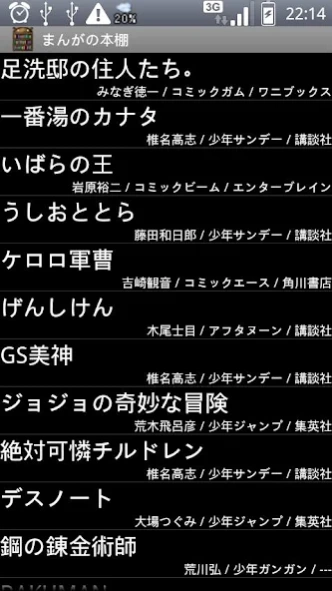
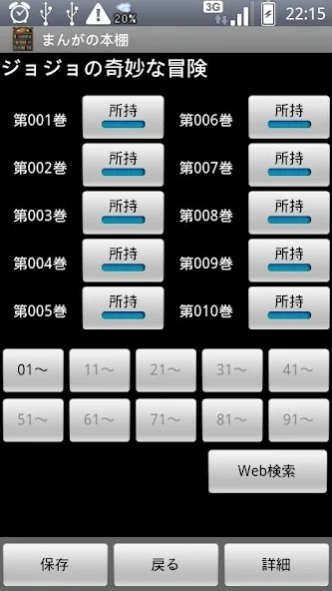

If this is used even if it forgets, it is safe what you bought.
If this is used even if it forgets, it is safe what you bought.
You can manage the title and information in the bought comic.
And you can input data by ISBN code.
it is possible to retrieve it to the registered comic with Amazon easily.
・Number that you have
・Author
・Magazine
・Publisher
・Memo
・This comic finished, or not.
You can import comic data from SD card by main menu.
And you can export too.
And a synchronous function with Dropbox was mounted.
The thing assumed to be Dropbox management in the SD card
makes the intelligence sharing in two or more terminals possible.
sdcard/MKSoft/Dropbox/ComicDataSync.txt
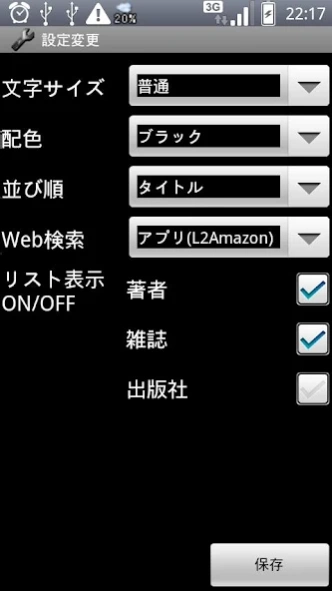
Moreover, you can do the setting change.
・Font size of comic list
(Small / Normal / Large / Huge)
・Background Color
(Black / White / Red / Blue / Green / Brown)
・sort key
(Title / OriginalSortKey / Author / Magazine / Publisher)
・WebSearch at
(Browser(Amazon) /InApp(Lead2Amazon) )
・Item displayed in list
(Newest / Sum / Finish / Rental)
(Author / Magazine / Publisher)
About MK Comic-BookShelf
The company that develops MK Comic-BookShelf is 三浦 健一郎 (Kenichiro Miura). The latest version released by its developer is 1.32. This app was rated by 1 users of our site and has an average rating of 3.0.
To install MK Comic-BookShelf on your Android device, just click the green Continue To App button above to start the installation process. The app is listed on our website since 2022-06-01 and was downloaded 7 times. We have already checked if the download link is safe, however for your own protection we recommend that you scan the downloaded app with your antivirus. Your antivirus may detect the MK Comic-BookShelf as malware as malware if the download link to Android.ComicData is broken.
How to install MK Comic-BookShelf on your Android device:
- Click on the Continue To App button on our website. This will redirect you to Google Play.
- Once the MK Comic-BookShelf is shown in the Google Play listing of your Android device, you can start its download and installation. Tap on the Install button located below the search bar and to the right of the app icon.
- A pop-up window with the permissions required by MK Comic-BookShelf will be shown. Click on Accept to continue the process.
- MK Comic-BookShelf will be downloaded onto your device, displaying a progress. Once the download completes, the installation will start and you'll get a notification after the installation is finished.
Program Details
System requirements
Download information
Pricing
Version History
version 1.32
posted on 2022-06-01
support backup/restore at Android11
version 1.31
posted on 2021-10-10
Android App Bundle
version 1.29
posted on 2015-07-09
Ver 1.29(2015/7/1),・layout fix.,Ver 1.28(2013/2/3),・fix a bug.,Ver 1.27(2013/1/28),・Enable set rental info at comic.,Ver 1.26(2012/4/8),・Change export data format.,Ver 1.25(2012/4/1),・Enable install SD-Card.,Ver 1.24(2012/3/18),・Add Search Function.,Ver 1.23(2012/2/3),・add new option.,Ver 1.22(2012/1/13),・Add a rental setting.,Ver 1.20(2012/1/7),・A synchronous function with Dropbox was mounted.,Ver 1.00(2011/4/5),・New Release
version 1.28
posted on 2013-02-03
Several fixes and updates
